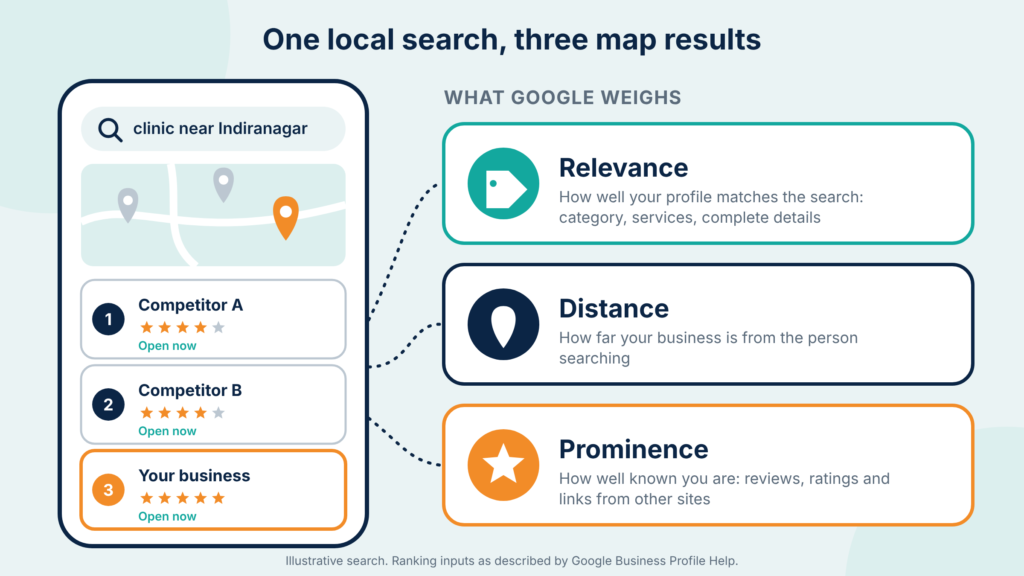
| Google Business Profile optimization in Bangalore means completing and maintaining your free Google listing so it matches what nearby customers search. Google ranks local results on relevance, distance and prominence. Choose the right category, keep details accurate, earn genuine reviews and add real photos to rank in Google Maps. |
Three Listings Get the Map Spotlight. Is Yours One of Them?
Picture a dental clinic in Indiranagar. The website looks sharp and patients rate the doctors well. Yet when someone nearby searches “dentist near me”, three other clinics fill the map first. This is a made-up scenario, but the pattern is familiar to anyone who has checked their own listing.
That map block is often the first thing a nearby searcher sees, and it is driven by your Google Business Profile, not your website. This guide covers Google Business Profile optimization in Bangalore: how local ranking works, what to fix first, and how to rank in Google Maps without breaking Google’s rules. It is the practical core of local SEO Bangalore businesses rely on.
| Key takeaways Google ranks local results on relevance, distance and prominence. You cannot pay for a better position. Primary category, address and business title carry the most weight in Whitespark’s 2026&27 expert survey. Reviews count in three ways: rating, quantity and recency. Accurate, complete details beat clever tricks. A keyword-stuffed business name can get a profile suspended. Measure calls, direction requests and website clicks, not only your map position. |
What Is Google Business Profile Optimization?
| Google Business Profile optimization is the process of completing, verifying and regularly updating your free Business Profile so Google can match it to local searches. It covers your category, address, hours, services, photos, reviews and posts. The goal is to appear in the local pack and Google Maps when nearby customers search. |
- Google Business Profile (GBP): the free listing that shows your business on Google Search and Google Maps.
- Local pack: the short, map-based list of businesses Google shows for local searches.
- Optimization: keeping the profile accurate, complete and active. It is not about tricks.
Profile work is one part of local SEO Bangalore businesses need, alongside website pages, citations and reviews. Get the profile right first, because every other local signal builds on it.
How Do Businesses Rank in Google Maps and Local Search?
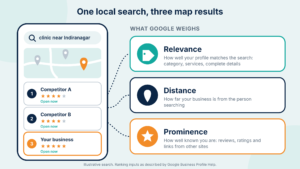
| Google says local results are mainly based on relevance, distance and prominence. Relevance is how well your profile matches the search, distance is how far you are from the searcher, and prominence is how well known you are. You cannot pay for a better local ranking. You can only improve what Google sees. |
- Relevance: complete, accurate details help Google match your profile to a search.
- Distance: how far your business is from the person searching.
- Prominence: how well known you are, including reviews and links from other websites.
Paid ads are a separate channel and do not buy a higher spot in the map ranking. We compare both routes in SEO vs Google Ads for Bangalore businesses.
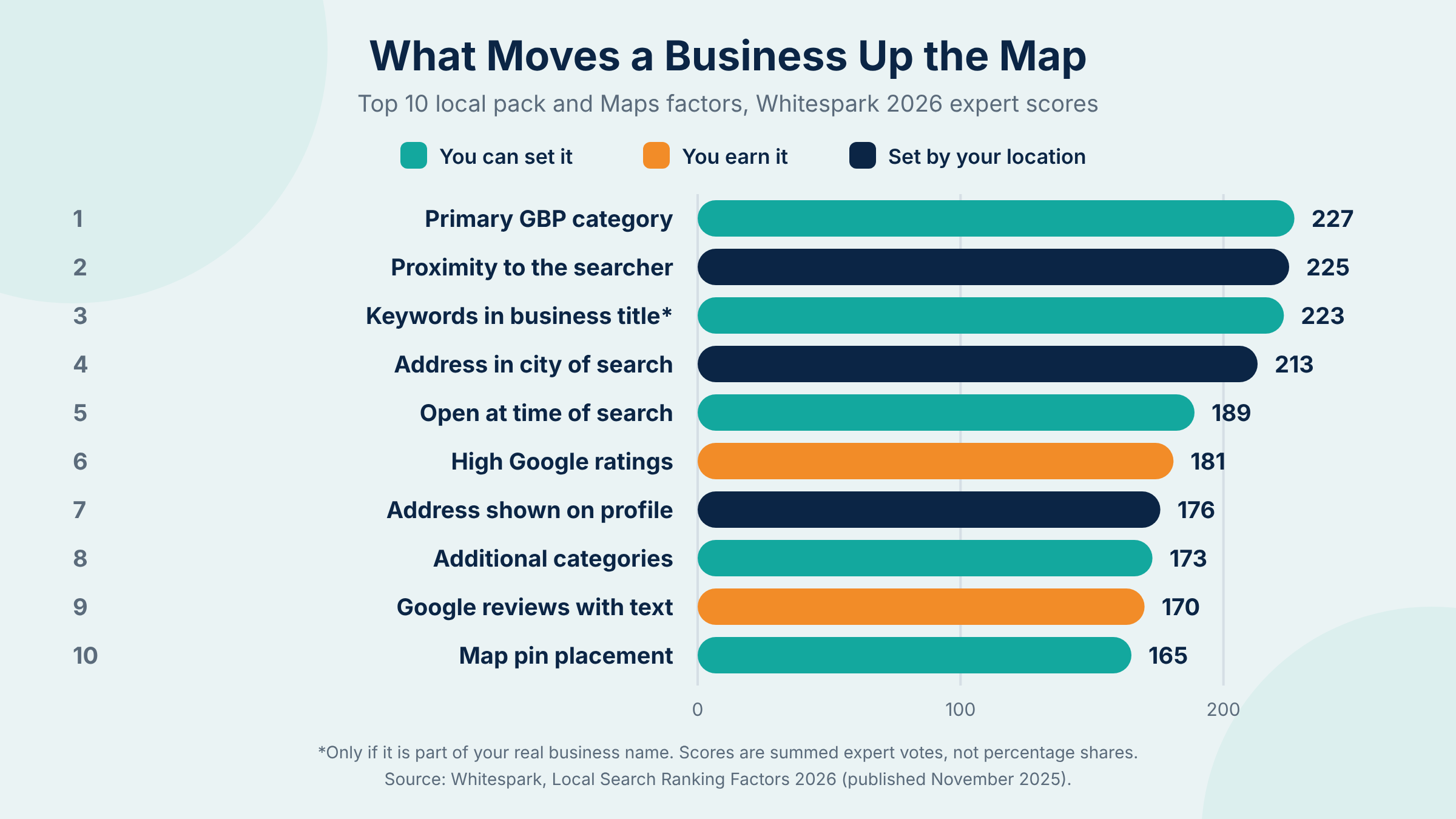
To see what experts think matters most, here are the top ten local pack and Maps factors from Whitespark’s 2026 Local Search Ranking Factors survey, published in November 2025.
| Rank | Ranking factor | Expert score | Who controls it |
| 1 | Primary Google Business Profile category | 227 | You set it |
| 2 | Proximity of address to the searcher | 225 | Set by location |
| 3 | Keywords in the business title | 223 | You set it (real name only) |
| 4 | Physical address in the city of search | 213 | Set by location |
| 5 | Business is open at time of search | 189 | You set it |
| 6 | High Google ratings | 181 | You earn it |
| 7 | Address showing on the profile (not hidden) | 176 | Set by business model |
| 8 | Additional categories | 173 | You set it |
| 9 | Quantity of Google reviews with text | 170 | You earn it |
| 10 | Proper map pin placement | 165 | You set it |
These are summed expert scores, not percentage shares, so read them as a ranking order. Two things stand out. Several top factors are settings you can fix today. And distance cannot be changed, which is why a business can show up in one Bangalore neighbourhood and not another.
One warning on factor 3. A keyword in the title only helps if it is part of your real-world business name. Adding extra words to your name breaks Google’s guidelines, as covered below.
Google Business Profile Optimization in Bangalore: What to Fix First
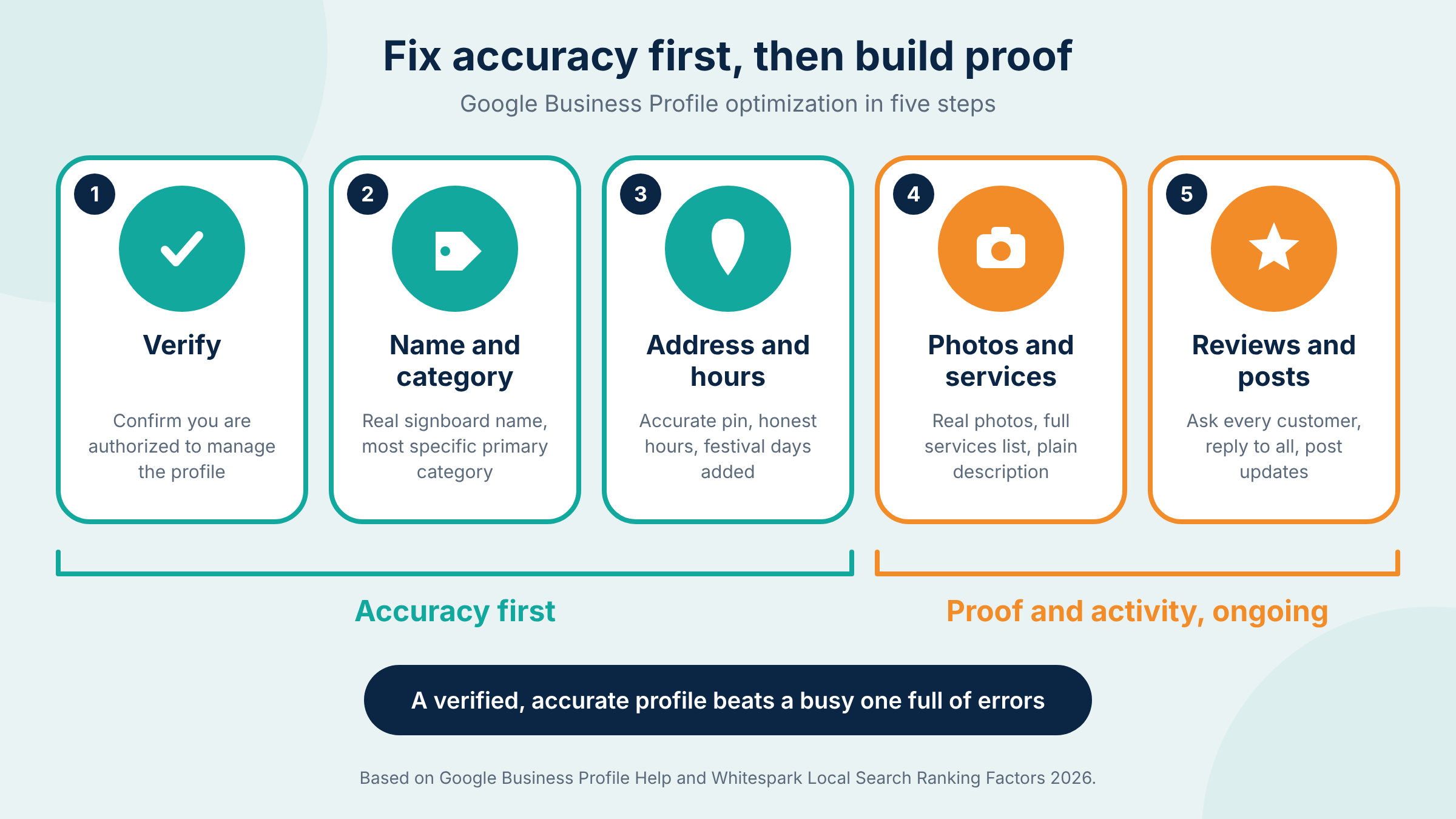
| Start with the fields that carry the most ranking weight: verify the profile, choose the most specific primary category, enter your real business name and address, set accurate hours and add your services. Then add photos, a plain description and regular posts. Accuracy matters more than volume at every step. |
1. Verify and claim your profile
Google says verification tells it you are authorized to represent the business, which makes the profile more likely to show in search results. Do this before anything else.
2. Pick the primary category carefully
Primary category is the top-scoring factor in the Whitespark survey. Choose the most specific option that describes your core business. Google advises using as few categories as possible, so add secondary categories only for services you genuinely offer.
3. Use your real business name
Google says your name should reflect your real-world name, the one on your signboard and stationery. Leave out taglines, service descriptions and location details. “Best Dentist in Indiranagar” is a fast route to a suspension, not a ranking boost.
4. Set the address, pin and service area
- Drop the pin on your actual entrance. Large tech parks, campuses and gated complexes make this easy to get wrong.
- Use a real, staffed location. Google does not accept PO boxes or virtual offices.
- Co-working spaces qualify only if you have clear signage, receive customers during business hours and have your own team on site.
- If you travel to customers and have no storefront, Google says to hide your address and define a service area.
5. Keep hours accurate, including festival days
Google warns that inaccurate info can stop a profile showing for relevant searches, and it lets you add special hours for holidays. Update them before Ugadi, Ganesh Chaturthi, Dasara and Diwali. Being open at the time of search is also a ranking factor (rank 5 in the survey).
6. Add services and a plain-language description
List every service you offer using Google’s service options and your own titles. Then write a short, honest description that names the neighbourhoods you serve. Skip URLs, offers and keyword lists.
7. Upload real photos
Google says photos and videos help customers see what you offer. Use your own: the entrance, the interior, your team and finished work. Add a photo of the street approach if your location is hard to find.
8. Post updates and link to the right page
Post offers, events and news regularly, and point the website button at the most relevant page rather than always the homepage.
How Do Reviews Help You Rank in Google Maps?
| Reviews influence how you rank in Google Maps through rating, quantity and recency. Whitespark’s 2026 survey scores high ratings at 181, quantity of Google reviews with text at 170 and review recency at 164. Google also counts review volume toward prominence and says replying shows you value feedback. |
- Ask every genuine customer. Share your review link on WhatsApp or put a QR code at the counter.
- Never pay for reviews. Google says incentivized reviews are not allowed and will be removed.
- Do not ask only happy customers. Google prohibits selectively soliciting positive reviews.
- Reply to every review, good or bad. Reply in the customer’s language where you can: Kannada, Hindi or English.
- Protect privacy. Clinics should never confirm patient details in a public reply.
Medical practices have extra rules to watch. Our guide to digital marketing for healthcare clinics in Bangalore covers how to handle reviews and trust signals safely.
What Bangalore Details Should Your Profile Cover?
| Strong local SEO Bangalore profiles win on local detail: the right neighbourhood, an accurate pin, festival-day hours and replies in the languages customers use. Distance is a core ranking input, so a business in Koramangala should not expect to dominate searches made in Whitefield. Build proof for the areas you truly serve. |
- Neighbourhoods: name the areas you serve in your description, such as Indiranagar, HSR Layout, Whitefield or Jayanagar.
- Access: show parking, the nearest metro station and the entrance in your photos.
- Language: write replies and posts in the language your customers use.
- Branches: Google says each location should have one profile, so give every branch its own profile and its own landing page.
- Healthcare: clinics and hospitals can pair profile work with digital marketing for healthcare to keep trust signals consistent.
What Mistakes Hurt Your Rank in Google Maps?
| The most common mistakes are keyword-stuffed business names, virtual-office addresses, too many categories, ignored reviews and duplicate profiles. Google’s guidelines say several of these can lead to suspension. Fix them before you invest in posts or extra listings, because they limit everything else you do. |
| Mistake | Why it hurts | Fix |
| Keywords added to the business name | Google says the name must reflect your real-world name. Extra terms can lead to suspension. | Use the name on your signboard |
| Virtual office or PO box address | Google does not accept them as a business location. | Use a real location, or hide the address and set a service area |
| Many unrelated categories | Google advises as few as possible to describe your core business. | One primary category plus a few real secondary ones |
| Incentivized or selective review requests | Google removes these reviews and treats them as policy violations. | Ask every customer and offer no rewards |
| Duplicate profiles for one location | Multiple profiles for the same location can trigger a suspension. | Merge or remove the duplicates |
| Outdated hours | Inaccurate info can stop the profile showing for relevant searches. | Update hours and add special hours |
How Do You Know If It Is Working?
| Track profile actions such as calls, direction requests and website clicks, then compare them month over month. Map positions change by location, so check from the neighbourhoods you serve rather than one spot. Use website analytics for the traffic your profile sends. Progress shows up as more customer actions, not only a higher position. |
- Profile performance: calls, direction requests and website clicks inside your profile.
- Several locations: local SEO Bangalore results change by area, so check Maps from several neighbourhoods, not just your office.
- Website traffic: add a tracking tag to the profile’s website link so you can see those visits in analytics.
- Monthly review: new reviews, hours, photos and any edits Google or users suggested.
Local questions are also answered by AI search tools, so keep your profile, website and listings consistent. That is where GEO services in Bangalore and our answer engine optimization guide fit in. No honest agency can promise a number one position, only better visibility.
Quick Guide: Which Fix Comes First for Your Business?
| Match your first fix to your business type. Storefronts should check pin and hours, service-area businesses should hide the address and define areas, clinics should handle review replies carefully, and multi-branch brands need one profile per location. Start with whatever could get your profile suspended. |
| Business type | Fix this first |
| Restaurant or cafe | Hours including festival days, real food and interior photos, review replies |
| Clinic or dental practice | Specific primary category, accurate details, careful review replies |
| Home services such as AC repair or plumbing | Service area setup with a hidden address, full services list |
| Startup in a co-working space | Check Google’s eligibility rules before creating the profile |
| Multi-branch retail or clinic chain | One profile per location and a landing page for each branch |
| New business | Verify first, then build a review habit from day one |
Where to Start: A Simple Rule for Local Rankings
| Fix accuracy first, then earn reviews, then stay active. A verified profile with the right category, real name, correct pin and honest hours beats a busy profile full of errors. Add genuine reviews and fresh photos steadily, and measure customer actions every month. Google rewards inputs it can trust. |
Market Kapchur handles Google Business Profile optimization in Bangalore as part of its local SEO Bangalore work: profile audits, category and service setup, review workflows, reporting and AI search visibility. Results depend on your competition and location, and we aim to improve visibility, not promise a position.
| Not sure where your profile stands on the map? Tell us your business type and the areas you serve, and an expert will walk you through the gaps. Get My Proposal or call +91 6364905511. |
Frequently Asked Questions
How long does it take to rank in Google Maps after optimizing my profile?
There is no fixed timeline. Edits may take time to appear, and ranking movement depends on competition, distance and review activity in your area. Verify first, fix errors, then build reviews steadily. Be careful with any agency that guarantees a map position, because Google says a better local ranking cannot be bought.
Can I rank in Google Maps without a shop?
Yes, if you are a service-area business. Google lets businesses that travel to customers create a profile for their base location with a defined service area, and says to hide the address from customers. Service areas should generally stay within about two hours of driving time.
What should I do about fake or unfair reviews?
Report the review if it breaks Google’s policies, then reply politely in public. Google says fake engagement is not allowed and will be removed. Do not offer a reward for changing or deleting a review, because Google prohibits that too. Keep a record of the customer’s visit to support your report.
How many reviews do I need to rank in Google Maps?
There is no magic number. Whitespark’s 2026 survey scores rating, quantity and recency, so a steady flow of genuine, recent reviews matters more than one burst. Compare yourself with the businesses already in your area’s map results and aim to keep pace with them.
Can I create a second profile for the same location?
Generally no. Google’s guidelines say each location should have one profile, and multiple profiles for the same location can lead to suspension. Check Google’s guidelines for any exceptions before you create one. Merge or remove duplicates instead of leaving both profiles live.
Sources
Google Business Profile Help, How to improve your local ranking on Google (relevance, distance, prominence and profile tips)
Google Business Profile Help, Guidelines for representing your business on Google (name, address, category and service-area rules)
Google Maps contribution policy, Fake engagement and incentivized reviews (review rules)
Whitespark, Local Search Ranking Factors 2026&27 (expert factor scores, published November 2025)